
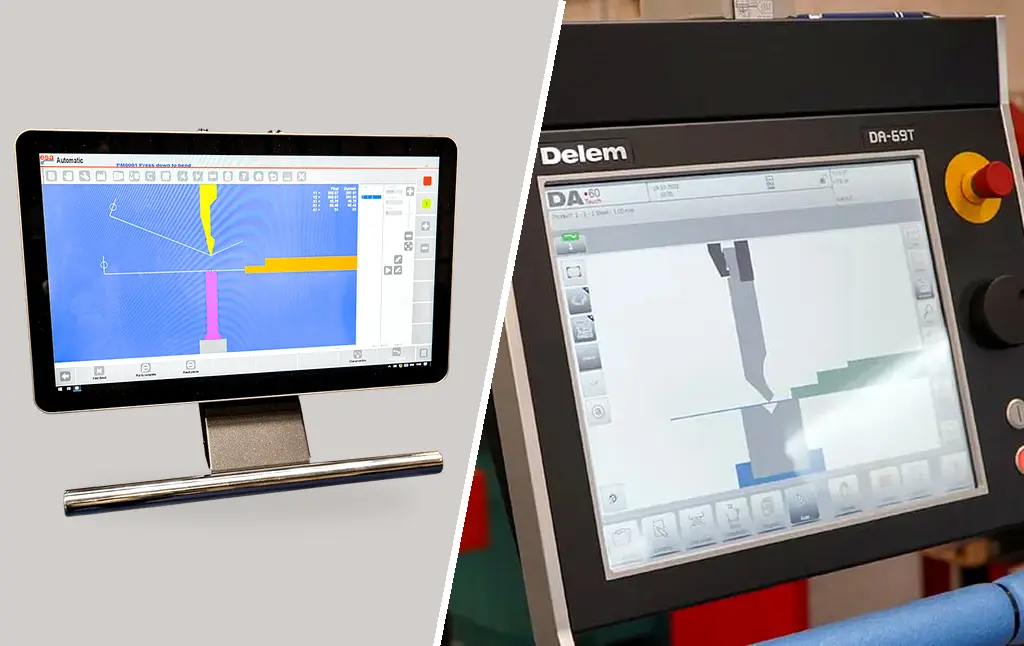
A controller should help your team turn approved drawings into repeatable bending jobs. A large screen or an extensive list of software features is useful only when the quoted package supports your actual workflow. Compare the controller, offline software, machine configuration and training together.
Separate four capabilities
Numerical programming enters bending positions and settings. Graphical programming represents the component and helps prepare the sequence. Visualisation displays the part or machine. Offline programming prepares a job away from the press brake. These are different functions: a 3D display alone does not establish full 3D CAD import, automatic sequencing or collision checking.
Identify the exact controller model, software version and enabled functions. Historic specifications for an ESA or Delem generation should not be applied to a current package without confirmation.
What offline programming should achieve
If the objective is to prepare the next job while production continues, demonstrate that workflow. Import a real customer file, select tools, prepare the sequence, generate a compatible programme and transfer it to the quoted machine. Then prove the first component.
Ask which file formats are supported, whether additional interfaces are required and who builds the machine and tooling libraries. A software package supporting a controller family may still require a suitable machine configuration or postprocessor.
Understand simulation limits
Ask which objects are included in collision checking: workpiece, punch, die, clamps, fingers and machine frame. Check intermediate handling and removal as well as the bending position. The simulation must represent the actual tooling and accessories.
A successful simulation is a planning aid. It does not replace safeguarding, operator training or verification on the machine. Keep the first-off approval process in place.
Compare licence and support scope
Confirm the software edition, number of users, machine coverage, updates, annual support and transfer method. Establish whether programme changes made at the machine can be brought back into the office system. Ask how programmes and tool libraries are backed up and recovered.
An included basic licence and a full 3D programming package are different offers. Request an itemised quotation so the functions needed for your parts are visible.
Controller selection for PBXS
The Morgan Rushworth PBXS is Selmach’s premium CNC hydraulic range. It is supplied with an ESA S875 CNC controller as standard, offering numerical and 2D graphical programming. Controller selection should reflect component complexity, changeover frequency and the programming skills available in your team. Ask Selmach to confirm the available alternatives and enabled software functions, then demonstrate the specific software package against your drawings.
For simple repeat jobs, intuitive recall and correction may matter most. For high-mix work, office preparation, tool-library accuracy and sequence validation may have greater value. Select the package that reduces useful preparation time and supports acceptable first-off parts.
Send Selmach a representative CAD file and describe how jobs currently reach the operator. Include your licence, network and training requirements in the enquiry. Our ESA tooling-programming guide remains a separate operating resource for the relevant control; this guide concerns purchasing the complete workflow.
Published 21st October 2026